Table of Contents
- Customer Experience Automation Examples at a Glance
- 1. AI Chatbot Answering FAQs
- 2. After-Hours Support That Doesn't Leave Customers Hanging
- 3. Automatic Lead Qualification
- 4. Instagram Comment-to-DM Automation
- 5. Facebook Automated Replies
- 6. WhatsApp Order Updates
- 7. SMS Appointment Reminders
- 8. Abandoned-Conversation Follow-Ups
- 9. Automatic Conversation Routing
- 10. Human-Agent Escalation (When the Bot Knows It's Time to Step Back)
- 11. Unified Inbox Follow-Up Workflows
- Key Metrics to Track Customer Experience Automation
- Wrapping Up
Everyone faces a problem when contacting a brand’s customer support. When a buyer sends a message and there is no response for hours, customers change channels looking for something quicker. But the agent doesn’t know what the prospect is talking about.
Customer experience automation solves all these problems. It makes support easy for customers in all the channels they use. When a customer asks a question on Instagram, they receive a helpful DM in seconds. Additionally, they will receive a friendly follow-up message asking if the problems still persist.
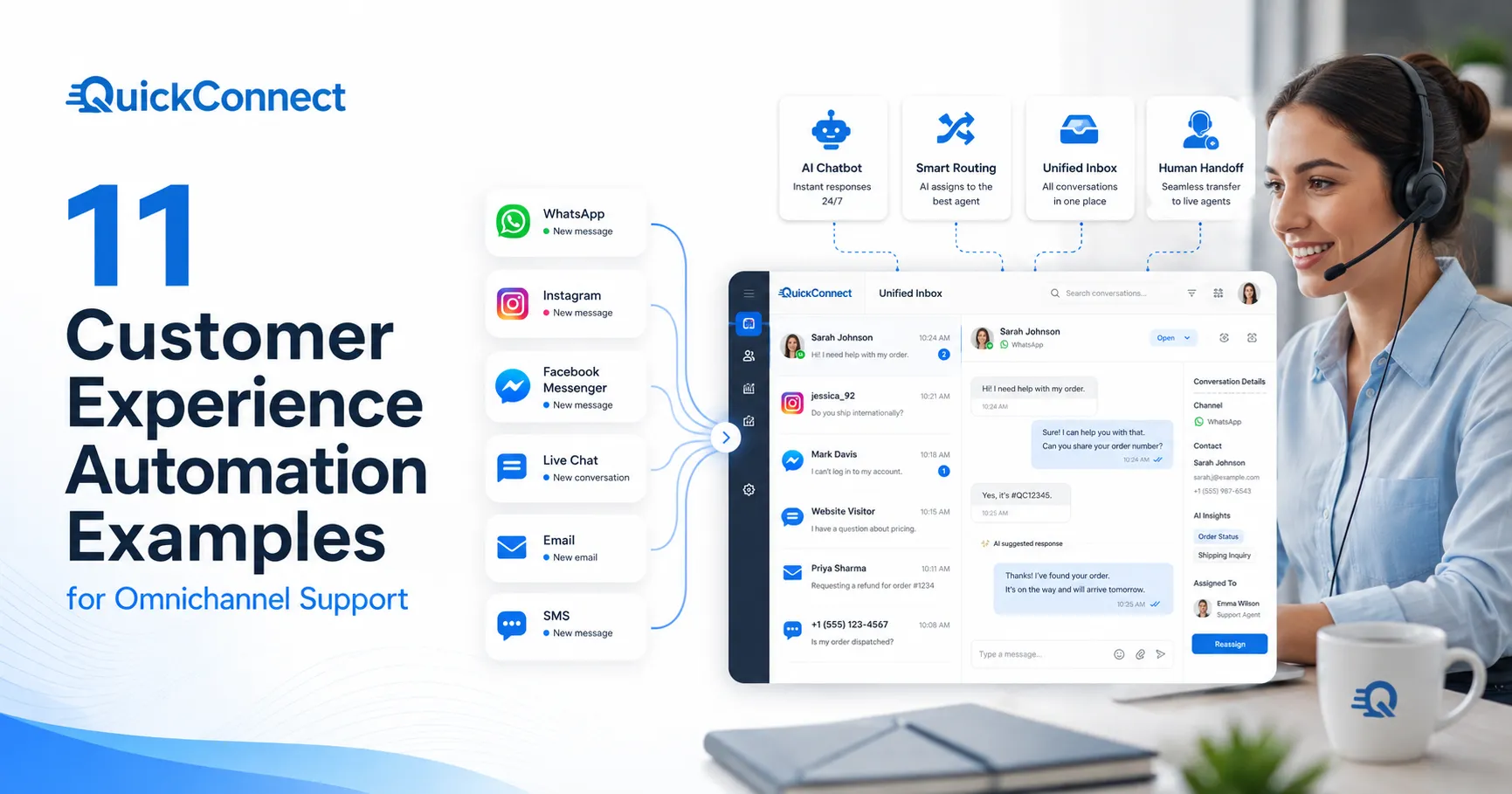
Let’s look at 11 customer experience automation examples for omnichannel support that businesses can utilize.
Customer Experience Automation Examples at a Glance
The examples below show how customer experience automation can work in everyday support, from answering common questions and qualifying leads to sending updates, routing conversations, and handing complex issues to a human agent
1. AI Chatbot Answering FAQs
Each support staff member has a few questions that occur again and again. These are not difficult questions. But they take hours from your team, and this is where it starts getting interesting, as customers don’t want to wait for a human to respond to them either. All they need is the answer.
The actual workflow of this is:
- Someone visits your site and asks a question
- The AI chatbot recognizes the objective of the question instead of only keywords but also the real purpose of the customer’s request.
- It retrieves the right answer from your knowledge base, product catalog, or help center and returns it immediately.
- It doesn’t shrug when the question is one that it has not been taught; it will respond with “I’m not sure about that one. Let me connect you with someone who can help” and direct the conversation to a live agent who has the context of the conversation.
When a large share of incoming questions are repetitive, such as order status, return policies, business hours, or account questions, AI chatbots can handle those routine interactions and give agents more time for complex or high-value conversations. Customers get faster answers while human agents can focus on issues that require judgment, empathy, or deeper investigation.
2. After-Hours Support That Doesn’t Leave Customers Hanging
Your business might close at 6 PM, but your customers’ issues don’t. At 10 PM, someone realizes that he was charged twice or attempts to make an appointment. A potential buyer is browsing your site at midnight and then has a sizing question and leaves without purchasing, as nobody is there to assist them.
All those moments are captured by after-hours support automation.
The process for the workflow:
- A customer messages you outside of business hours.
- The bot greets the message positively and checks to see if it can resolve the issue.
- If it can’t do it, it gathers up the necessary information and generates a ticket that’s waiting in the queue for your team first thing in the morning with all the context.
- The customer receives the message response: “Got it. A team member will follow up by 10 AM tomorrow. Here’s your reference number.”
Customer enquiries can arrive outside normal business hours, especially for online businesses or companies serving customers across multiple time zones. Without an after-hours process, those messages can accumulate until the team returns. Automation can acknowledge the customer immediately, resolve routine questions, or collect enough context for an agent to continue the conversation later.
The greatest after-hours arrangements likewise have clever prioritization. By alerting an on-call team member instead of waiting until morning, the bot can send an alert if it detects urgency (words such as “fraud,” “locked out,” or “emergency”).
3. Automatic Lead Qualification
Not all of the messages that come into your website chat or social DMs are support requests. Some of them are potential customers looking for pre-purchase questions. How quickly and how effectively you can manage those interactions can make a difference in terms of revenue.
The problem is that your support agents aren’t salespeople, and your sales team can’t monitor every chat channel all day. Automatic lead qualification bridges that gap.
How the workflow works:
- A visitor starts a conversation on your website chat, WhatsApp, or a social channel.
- The automation asks a few qualifying questions, naturally woven into the conversation, not a rigid form.
- Based on criteria defined by the business, such as purchase intent, fit, budget, or timeline, the system can score or categorize the lead.
- Warm leads get added to a nurture sequence, maybe a follow-up email with relevant case studies or a link to book a demo.
- Cold leads or support requests get routed to the appropriate team.
The magic is in making the qualification feel like a conversation, not an interrogation. Nobody wants to fill out a form disguised as a chat. The best bots ask one question at a time, respond to answers with relevant follow-ups, and feel like a helpful concierge rather than a gatekeeper.
4. Instagram Comment-to-DM Automation
This is a game-changer for any brand that is engaged on Instagram, and this is still being underused. When you share a picture of the product, a reel, or a story, customers ask for price, delivery times, and sizes.
With Instagram comment automation, the system can automatically send a DM to them when they reply to your post with one of the trigger words or phrases mentioned above, such as price, info, or order. The DM can pick up the conversation in private, and the bot can provide info about pricing, links to products, sizing guides, or even place an order without filling up your PM comments section.
How the automation handles it:
- When someone comments on your post with a specific trigger word or phrase (like “price,” “info,” or “order”), the automation instantly sends them a DM.
- The DM picks up the conversation privately, where the bot can share pricing, product links, sizing guides, or even take an order, all without cluttering your comments section.
- For comments that don’t match a trigger, the system can still auto-like or leave a brief public reply to keep engagement high.
Why brands love this workflow:
- It turns passive engagement (comments) into active conversations (DMs) where buying actually happens.
- It can respond automatically as soon as a matching comment is detected, helping the business engage the customer while their interest is still fresh.
- It keeps detailed product or sales discussions out of the public comment thread while moving the conversation into a more private and personalized DM experience.
- It works for product launches, flash sales, giveaways, and Q&A posts.
5. Facebook Automated Replies
Fast responses still matter for the customer experience. Meta allows Facebook Pages to configure automated instant replies through Meta Business Suite, helping businesses acknowledge Messenger conversations even when an agent is not immediately available. Automation can therefore reduce the time customers spend waiting for an initial response.
For Messenger:
- One of your customers messages you through your Facebook page. The automation automatically replies and provides the most common responses.
- Depending on the selection, the bot processes typical queries such as tracking orders, store hours, return policies, and more, or collects context and directs to a human when necessary.
- The bot can handle the complete conversation with a person, or it can take down information for a conversation with a person in the morning (tying back to the after-hours workflow, covered above).
For page comments:
- The automation can send a private message via Messenger with additional information when customers post a comment on your post or ad with a question or to ask if they want to buy.
- It’s particularly impactful for Facebook Ads. They comment on your ad, and a Messenger conversation guides them to your next step in seconds.
Facebook’s algorithm will favor pages that are fast. In fact, your page will tell the visitor how long you take to respond (you usually respond within minutes, and the quicker you respond, the more visible you’ll be). That’s where automation comes in. That is where automation can help you achieve that benchmark, regardless of the size of your team.
6. WhatsApp Order Updates
WhatsApp order updates gives e-commerce and service businesses another direct channel for sharing order confirmations, shipping updates, delivery notifications, and other transactional information. Because customers can reply within the same conversation when they need help, order updates can also become a convenient starting point for customer support.
How it works:
1. A customer makes an order via your eCommerce website, application, or WhatsApp.
2. They are instantly notified of their order details, total price, and expected delivery date via WhatsApp.
3. As the order proceeds, they receive updates, e.g.:
- Order packed
- Order shipped
- Out for delivery
- Order delivered
4. When there is a delay, the customer receives a message before inquiring. The message can contain details of the new delivery time and an opportunity to respond to get help.
5. Once they’ve made their delivery, you can follow up to get their input and offer them an opportunity to leave a review or begin a return.
Why use WhatsApp?
WhatsApp adds a personal touch compared to email. It is something that is already being used today for ordering, and update messages can be perceived as friendly communication between the customer and the company, compared to a regular company notification.
If customers have any queries, they can respond to the same chat. They need not look up a support email, visit a website, or call.
Important technical point
Order confirmations, shipping notifications, and delivery updates are generally business-initiated messages. On the WhatsApp Business Platform, businesses must obtain customer opt-in and use approved message templates when contacting customers outside the 24-hour customer service window.
When a customer sends a message, the business can respond without a template for 24 hours following the customer’s latest message. After that window closes, an approved message template is required. For complete requirements, refer to Meta’s WhatsApp messaging documentation.
7. SMS Appointment Reminders
No-shows cost you a lot of money if you have an appointment-only business like a health care clinic, salon, fitness center, consulting firm, home services business, or auto repair shop. According to industry statistics, SMS reminders can cut down on missed appointments by approximately 25-40%.
It’s a slight upgrade, but it could make all the difference. For instance, if you have 30 appointments each day and you typically have a 15% no-show rate, you could improve your calendar by recovering 1-2 appointments daily with better reminders. That can add up to tens of thousands of dollars of revenue recouped in a year.
How the workflow works:
- A customer books an appointment (online, by phone, or in person).
- The system automatically sends a confirmation via SMS: “Your appointment with [Business] is confirmed for Thursday, Aug 14, at 2:00 PM. Reply C to confirm or R to reschedule.”
- Before the appointment, the business can send one or more SMS reminders based on the type of service and how far in advance the appointment was booked.
- A final reminder can be sent closer to the appointment with useful details such as the address, parking information, or preparation instructions.
- If the customer replies “R” to reschedule, the automation can offer available time slots directly or route them to the booking system.
What makes this work beyond basic reminders:
- Two-way SMS. The best implementations let customers reply directly. Reschedule, cancel, or ask a quick question, all within the text thread. No app downloads, no logins, no phone calls.
- Smart timing. Different reminders are not required for all appointments. For instance, if a dental appointment is scheduled 2 weeks ahead, it may be useful to send a couple of reminders. However, if an appointment is made for the rest of the day, a single confirmation might suffice.
- Post-appointment follow-up. After the visit, send a quick SMS asking for feedback or prompting a review. “Thanks for coming in today! How was your experience? Leave a quick review here: [link].
8. Abandoned-Conversation Follow-Ups
This is a strong automation tool that many companies aren’t taking advantage of. A customer initiates a conversation with your business via live chat, WhatsApp, Messenger, or another messaging platform. They ask a question, you answer, and then nothing.
Perhaps they were distracted, their phone battery was flat, they entered into a meeting, or something else occurred. Most businesses just call the chat session over. If the customer does not respond, it will eventually be closed and moved to the unresponsive status.
However, the customer may still have a question that hasn’t been answered. But when they are asking for a product or service prior to the sale, that silence could result in a lost sale.
How the follow-up workflow works:
- When the customer has not responded within a business-defined period, the conversation can be marked as inactive. The appropriate timing will depend on the channel, type of conversation, and customer intent.
- Instead of closing the conversation immediately, the automation sends a gentle follow-up.
- If the customer responds, the conversation picks back up seamlessly with the full context still intact.
- If the customer still doesn’t respond after a longer follow-up period, the system can send one final message before closing the conversation gracefully.
- For pre-sales conversations, the follow-up can include a relevant offer or a link back to the product they were asking about: “Still thinking about the [product]? Here’s a 10% off code if you’d like to grab it: SAVE10.”
9. Automatic Conversation Routing
There is nothing more frustrating for a customer than being bounced between agents. Each transfer is an added delay in the process, requires the customer to repeat themselves, and chips away at the customer’s patience. By routing a conversation to the appropriate person from the very beginning, most of these transfers can be avoided with automatic conversation routing. How the workflow works:
- A customer sends a message on any channel: chat, WhatsApp, Messenger, email, SMS, Instagram DM.
- The automation analyzes the message to determine three things:
- Topic: What is this about? (Billing, shipping, technical issue, pre-sales question, complaint?)
- Language: What language is the customer using?
- Priority signals: Are there urgency indicators? (Keywords like “urgent,” “fraud,” “cancel,” or repeat-contact patterns?)
- Based on that analysis, the conversation is routed to the right team or agent: the billing specialist, the technical support engineer, the Spanish-speaking agent, or the escalation queue.
- The agent receives the conversation with the full context and the AI’s analysis so they can jump straight into resolution without preamble.
10. Human-Agent Escalation (When the Bot Knows It’s Time to Step Back)
Automation is brilliant at handling repetitive, predictable tasks. But there are moments, and every support team knows them, where a human needs to step in. A customer is genuinely upset; the issue is complex and multi-layered. Someone is threatening to cancel a high-value account. The situation requires empathy, judgment, or authority that a bot simply doesn’t have.
The best automation doesn’t try to handle those moments. It recognizes them and gets out of the way fast.
How the escalation workflow works:
- A customer is interacting with a chatbot or automated system on any channel.
- The system monitors for escalation triggers. These can be:
- Explicit: The customer types “talk to a person,” “agent,” “human,” or “I need help from a real person.”
- Sentiment-based: The AI detects rising frustration, short, curt responses, negative language, ALL CAPS, or multiple failed resolution attempts.
- Complexity-based: The issue involves multiple products, policy exceptions, legal concerns, or anything outside the bot’s trained scope.
- Value-based: The customer is a VIP, enterprise account, or has a high lifetime value that warrants white-glove service.
- When triggered, the human handoff should happen smoothly. The bot says something like, “I want to make sure you get the best help on this. I’m connecting you with [Agent Name] right now. They’ll have everything we’ve discussed so far.”
- The human agent receives the full conversation transcript, the bot’s analysis of the issue, any relevant customer data (order history, account status, previous tickets), and critically, a suggested resolution or next step.
11. Unified Inbox Follow-Up Workflows
This is the workflow that ties everything else together, and honestly, it’s the one most businesses are missing. You’ve got conversations coming in from everywhere: WhatsApp, Instagram DMs, Facebook Messenger, website chat, email, and SMS.
Each channel has its own interface, its own notification system, its own little world. Agents are constantly switching tabs, conversations fall through cracks, and follow-ups get missed because nobody remembered to check the Instagram inbox after lunch. A unified inbox pulls every conversation from every channel into one view. But the real power isn’t the inbox itself; it’s the automated follow-up workflows built on top of it.
How the workflow operates:
- All incoming messages, regardless of channel, land in a single inbox that your team works from.
- Every conversation gets tagged, categorized, and prioritized automatically (using the routing logic from Example #9).
- When a conversation requires follow-up (waiting on the customer, waiting on an internal team, or needing a check-in after resolution), the system tracks it.
Automated follow-up scenarios:
- Post-resolution check-in: After a chosen follow-up interval, the customer can receive a message on the same channel asking whether the issue has been fully resolved. If they respond, the conversation can reopen with its previous context.
- Pending response reminder: If an agent sends a question and the customer does not respond within the team’s chosen follow-up window, automation can send a polite reminder.
- Internal SLA alerts: If a conversation has been open for longer than your SLA target, the system alerts the assigned agent and their manager. No ticket sits forgotten.
- CSAT survey: After resolution, the system automatically sends a brief satisfaction survey on the channel the customer prefers. “On a scale of 1-5, how was your experience today?” The responses feed directly into your reporting.
- Cross-channel consistency: When the channels can be matched to the same customer profile, a unified inbox can bring conversations such as yesterday’s WhatsApp chat and today’s email into the same customer history.
Key Metrics to Track Customer Experience Automation
Once you’ve implemented any of these workflows, here’s what to track. Choosing the right customer engagement metrics helps you understand whether automation is actually improving the customer experience
| Metric | What It Tells You | How to Interpret It |
|---|---|---|
| First Response Time | How quickly customers receive an initial response | Compare performance by channel against your own baseline and work to reduce delays without sacrificing response quality. |
| Automated Resolution Rate | How many conversations automation resolve without human intervention | Look for improvement while monitoring CSAT and repeat contacts to make sure issues are actually being solved. |
| Escalation Rate | How often automation transfers conversations to humans | There is no universal ideal rate. It should reflect the complexity and risk of the conversations being automated. |
| Abandoned Conversation Recovery | How many inactive conversations are successfully re-engaged | Track improvement over time and compare different follow-up strategies. |
| No-Show Rate | How often customers miss scheduled appointments | Compare rates before and after introducing reminders rather than relying on a universal benchmark. |
| CSAT | How satisfied customers are after an interaction | Track whether satisfaction remains stable or improves as automation expands. |
| Follow-Up Completion Rate | Whether scheduled customer follow-ups actually happen | Monitor missed follow-ups and use automation to improve consistency. |
Wrapping Up
These eleven customer experience automation examples aren’t theoretical. They are workflows that real businesses from solo entrepreneurs to enterprise brands are running right now, across the channels their customers actually use.
The common thread across all of them is this: good automation doesn’t replace the human experience. It removes the friction, the waiting, the repetition, and the forgotten follow-ups that make customer support feel like a chore for both the customer and the team.
Start with the workflows that solve your biggest pain point. Build them out on the channels your customers prefer. And always, always leave a clear path to a real person for the moments that need one.