Table of Contents
- What Is Live Chat Etiquette?
- What Makes Chat Etiquette So Important For Great Customer Support?
- The Essential Dos: What Great Chat Agents Always Do
- The Critical Don'ts: Mistakes That Kill Trust Fast
- Tricky Live Chat Situations and How to Handle Them
- Essential Live Chat Etiquette Rules for Customer Support
- Turning Etiquette Into Everyday Habits
Live chat is not just about typing quickly and answering questions. The tone and approach of customer support agents can directly influence the customer experience when interacting with customers, asking questions, providing solutions, and dealing with frustrated messages.
That’s where live chat etiquette comes into play. Good chat etiquette must be used to ensure that the teams sound professional without sounding robotic. It helps with clarity, reduces frustration, and makes the customer feel like they are communicating with a human who cares.
If you’re new to the concept, our guide on what live chat is explains how businesses use this communication channel to interact with website visitors and provide real-time support.
This guide will discuss the do’s and don’ts of live chat etiquette, how to initiate the conversation and respond quickly, how to deal with difficult customers, and when to end the live chat.
What Is Live Chat Etiquette?
Live chat etiquette is the rules and best practices for supporting agents to help customers through live chat. From greeting customers to answering questions quickly, from your language to your approach to solving problems, even when dealing with challenging conversations, it is all about you.
As opposed to phone or in-person communication, live chat leaves it to the customer to interpret your tone and attitude through your written message. A quick answer may seem rude; a thoughtful, friendly answer may seem like you have listened and respected your customers. The best live chat etiquette is quick responses, professional and clear language, personalizing chats, avoiding unnecessary jargon, and ensuring the customer is aware of what will happen next.
It is not just about answering questions; it is about making each interaction helpful, respectful, and easy for the customers.
Good chat etiquette helps create better conversations, but it is also worth understanding the wider value of this communication channel. Explore the benefits of live chat to see how it can improve customer support, strengthen relationships, and make it easier for businesses to connect with customers.
What Makes Chat Etiquette So Important For Great Customer Support?
Good chat etiquette can have a direct impact on a customer’s impression of a company. If an agent offers the right answer, a slow and unfriendly process can affect the customer’s opinion.
Industry research also highlights the importance of live chat in customer support. Check out these live chat statistics to see how response times, customer preferences, and satisfaction levels shape the customer experience.
- Makes a positive first impression: Many customers will talk to a live person via chat for the first time. A friendly greeting, a prompt response, and a professional tone convey that their question is important from the get-go.
- Builds customer trust: Customers feel that they are speaking to someone who has a problem that they can relate to. The support experience is more reliable when they receive explanations, honest answers, and a consistent experience.
- Reduces miscommunication: Written exchanges can be subject to misunderstandings. Clear language, using complete sentences and concise explanations, will avoid confusion and unnecessary back-and-forth.
- Makes difficult conversations easier: Not all customers will be satisfied. An agent’s tone is important when their client is frustrated. Empathizing, admitting there is a problem, and setting aside the problem to think of a solution may help to avert difficult conversations turning into an argument.
- Improves customer satisfaction: Typically, customers expect three things from live chat service: prompt response, clarity of the answer, and smooth customer service. By following the basic etiquette of the chat, you can provide all three without the chat feeling robotic.
- Improves the brand experience: All support interactions are also a reflection of the company. The regular, professional interaction will help build a good impression of the brand, and the wrong answers given will damage it.
The Essential Dos: What Great Chat Agents Always Do

1. Respond Fast
Fast replies are expected, and it is important that they are not at the expense of accuracy. A hasty answer that does not really help can be more irritating than a delayed one. If more time is required, please explain to the customer.
For example, you can say, “Let me look at that; I’ll let you know as soon as I have an update.” It’s best to inform the customer rather than make them wait without saying anything.
2. Use Their Name
The use of a customer’s name can help make a chat more personal and friendly. For example, “Hi Sammy! “Hello, I’m Alex from the billing team. I’m here to help.” It’s also a good idea to introduce yourself where appropriate. Try not to say the same name in each message given, though, because it may come across as unnatural. Incorporate their name into the opening or when it helps to make the conversation more personal.
Your opening message sets the tone for the entire conversation. For more inspiration, explore these live chat welcome messages to find greeting examples for different customer situations.
3. Match the Customer’s Tone
Communicate appropriately with the customer. If the customer is casual, use a friendly and conversational tone. If they are more formal, maintain a business tone. Don’t sound too formal in response, like:
- “Hello, dear customer, thanks for contacting a customer service representative.”
- When a simple *“Hi! It would be better to say, “How can I help?”
Make replies sound natural, while remaining professional.
4. Confirm the Problem Before You Jump to the Fix
Before you attempt to solve a customer’s problem, be sure to know what the problem is. An instant confirmation can avoid confusion and roundabout communication.
For example:
“Just to let you know, you’re receiving an error message while trying to update your payment details, right?”
This helps you prove that you are listening and that the right solution is being provided. Make sure you verify the issue with the customer if he/she has requested something, but it’s not clear or requires multiple details.
5. Keep Messages Short and Clear
Live chat services are not the same as email. Typically, readers are looking for concise answers that are easy to read.
When explaining a process, keep the sentences short and use simple language and numbered steps. Don’t post a whole paragraph or a whole help article in the chat. Provide enough information for customers without forcing them to read more than they have to.
Clear communication is just one part of handling live chat effectively. Agents also need to understand customer concerns, manage multiple conversations, and find solutions without making customers wait unnecessarily. Developing these chat handling skills can help support teams manage conversations more confidently while maintaining a positive customer experience.
6. Be Proactive
In the event that a customer seems to be in need of assistance, proactive chat is beneficial. For instance, if someone is on a pricing or checkout page, they might need help, so offer it. You can use live chat triggers to automatically initiate conversations based on visitor behaviour, such as spending time on a pricing page or showing signs of leaving the website. Displaying chat messages frequently, however, can begin to be a nuisance. Provide assistance if it is in good cause, not constantly.
7. Close the Loop Before You Close the Chat
At the end of the discussion, ensure that the customer has all the items needed. Offer assistance if you have something else you’re able to do.
For example:
- “Does anyone else need anything else?”
If the issue is resolved, finish with a friendly closing:
- “Well, that’s taken care of now! Sarah, good day.”
Always keep a conversation going. Ensure that the customer is happy before ending a chat.
The Critical Don’ts: Mistakes That Kill Trust Fast
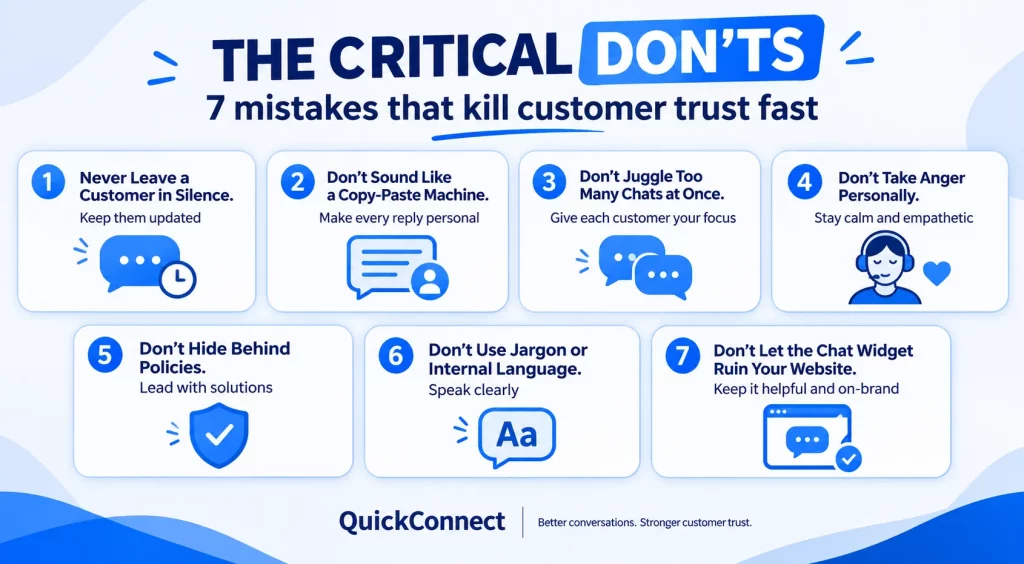
1. Never Leave a Customer in Silence
A quiet wait makes a short time seem longer. Take more time to find an answer if you need it; don’t leave the customer wondering what is going on. A simple statement like “I’m still researching. Be patient!” will go a long way.
Don’t wait for the customer to reply for some time. Send a quick update if the solution takes longer than expected.
2. Don’t Sound Like a Copy-Paste Machine
There are times when a canned response is helpful and efficient, but the use of them without customizing the message can make your support feel robotic. Use a template and then tailor it to the customer’s question. State their exact issue and strike out anything that is not relevant to their issue.
Don’t send the same reply to all customers. Instead, start with a template and customize each response to fit the conversation.
3. Don’t Juggle Too Many Chats at Once
Having multiple conversations simultaneously can speed up the agent’s process, but having too many can cause delays in response and ultimately errors.
Don’t aim to chat to too many people at once; make sure you maintain both response speed and answer quality.
Avoid entering into more engagements than allowed. Instead, do a small number of chats and devote appropriate attention to each customer.
4. Don’t Take Anger Personally
A problem with the product or service might cause a customer to become frustrated, and reacting in a defensive manner may exacerbate the situation.
One can help with a simple Acknowledge, Apologize, Act:
- Acknowledge: “I know how that can be upsetting.”
- Apologize: “I’m sorry that you’re having to go through this.”
- When the student says, “Act: Let me see what I can do to fix this for you.”
Don’t: argue, use sarcasm, or blame the customer. Instead, remain calm, be empathetic, and get to the solution.
5. Don’t Hide Behind Policies
Citing “our policy” can leave customers with the impression that no one’s interested in assisting them. If you have to do what a company has asked you to do, be sure to make sure you are clear about this and consider other ways to assist.
Instead of, “We do not accept returns after 30 days,” you can try: “The 30-day return period is over, but an exchange or store credit may be available.”
6. Don’t Use Jargon or Internal Language
Customers may be unaware of what internal elements are part of the service, like “L2 support”, “SLA,” or “ticket escalation.”
Write in simple terms that are easy to understand. Instead of: “This will be taken up by our L2 support,” say: “Let me put you in touch with someone who can assist you with this.” The best practice is to use clear, customer-friendly language; don’t use internal terms.
7. Don’t Let the Chat Widget Ruin Your Website
A good website experience is an important part of effective live chat support. The chat widget should make it easier for visitors to get help, not interrupt their browsing experience or make it difficult to navigate the website.
Ensure that the widget is easily minimisable, will not obstruct buttons or navigation, and will function on mobile devices. Test your chat widget on desktop as well as mobile devices before you expose your customers to it.
Tricky Live Chat Situations and How to Handle Them
Not all customer service chats have a straightforward right or wrong answer. In some instances, you have to read the conversation and make a decision. Here are a few scenarios that can be confusing to help you get to know the rules for live chat etiquette:
Emojis and humor: read the customer’s mood
Emojis can make a live chat feel friendly and natural. A simple emoji can add warmth to a positive conversation. But using an emoji when a customer is angry or making a complaint can make you seem like you are not taking them seriously.
If the customer uses emojis and the conversation is friendly, you can use one too. If the customer is frustrated, keep your response professional and focus on solving the problem.
The same applies to humor. A joke may work in a casual conversation but feel inappropriate when a customer is dealing with a serious problem.
When you’re unsure, skip the emoji and humor. Clear and helpful words are usually enough.
When to transfer a customer to another agent
Knowing when to transfer a customer is an important part of good customer support etiquette. Transferring a customer too quickly can make them feel like they are being passed from one agent to another. But spending too much time on a problem you cannot solve can waste their time.
If the issue requires a specialist or you do not have the information needed to solve it, transfer the chat. Just make sure you explain what is happening.
Instead of saying: “You’ll need to talk to our billing team,” try: “I’m going to connect you with Jordan, our billing specialist. I’ve shared the details of your conversation, so you won’t need to explain everything again.”
This makes the transfer feel helpful instead of frustrating.
Don’t make customers repeat themselves
AI chatbots can help answer simple questions, but some problems need a human agent. This makes the chatbot-to-human handoff an important part of the customer experience.
Imagine explaining your problem to a chatbot and then hearing: “How can I help you today?” Having to explain everything again can quickly frustrate a customer.
Make sure the human agent can see the relevant chatbot conversation. The agent should know what the customer asked, what the chatbot suggested, and what still needs to be resolved.
Customers should not have to repeat information just because they moved from a chatbot to a human agent.
A smooth handoff makes customer support feel faster and more connected. A poor handoff can make the customer feel like they are starting the conversation all over again.
Essential Live Chat Etiquette Rules for Customer Support
Great etiquette isn’t about talent. It’s about training. And the best way to make it stick? A one-page cheat sheet that every agent can pin next to their screen.
Here’s what to include:
| Category | Rule |
| Speed | First reply under 30 seconds. Update every 60 seconds if delayed. |
| Greeting | Use the customer’s name. Introduce yourself. |
| Tone | Match the customer’s formality level. |
| Clarity | One idea per message. No jargon. No walls of text. |
| Complaints | Acknowledge → Apologize → Act. |
| Banned Phrases | “That’s our policy.” / “That’s not my department.” / “As I already stated.” |
| Emojis | Mirror the customer. Skip during complaints. |
| Transfers | Explain why. Introduce the next agent. Pass the history. |
| Closing | “Anything else?” → Warm sign-off. |
Turning Etiquette Into Everyday Habits
At the end of the day, mastering live chat etiquette isn’t about memorizing a rigid rulebook or hiding behind robotic scripts. It’s simply about remembering that another human is sitting on the other side of that digital screen.
Because live chat strips away body language and vocal tone, every word, punctuation mark, and second of response time carries real weight. When your support team leads with genuine empathy, keeps explanations clear and concise, and treats customers like people rather than ticket numbers, you do more than just solve problems; you build genuine loyalty.
Keep your cheat sheets handy, treat difficult conversations as opportunities to connect, and watch how quickly good chat etiquette transforms ordinary support interactions into memorable brand experiences.