Instagram has become one of the most powerful platforms for businesses to connect with their audience, generate leads, and drive sales. However, managing every message, comment, and interaction manually can be time-consuming. That’s where Instagram automation comes in.
In this blog, you’ll learn how to use QuickConnect’s Instagram automation to automatically respond to users, capture leads, and turn everyday interactions into real business opportunities.
What is QuickConnect Instagram Automation?
QuickConnect Instagram automation is an AI powered comment and DM automation tool that automatically manages routine Instagram activities such as replying to messages, and responding to comments based on predefined rules. Its main purpose is to save time while keeping an account active, responsive, and consistently engaged.
Automation ensures consistency and quicker responses instead of sitting online the whole day. It serves genuine engagement (rather than supplanting it) when applied properly. The best Instagram automation is natural to followers and works behind the scenes, and gets results quietly.
With QuickConnect, automation means:
- Replying instantly when someone comments or sends a DM
- Sharing information like prices or links without typing the same message again
- Keeping conversations moving, even when you are busy or offline
Used correctly, automation feels natural to your followers. They get faster replies. You get breathing room.
Why Use Instagram Automation?
1. Instant Replies 24/7
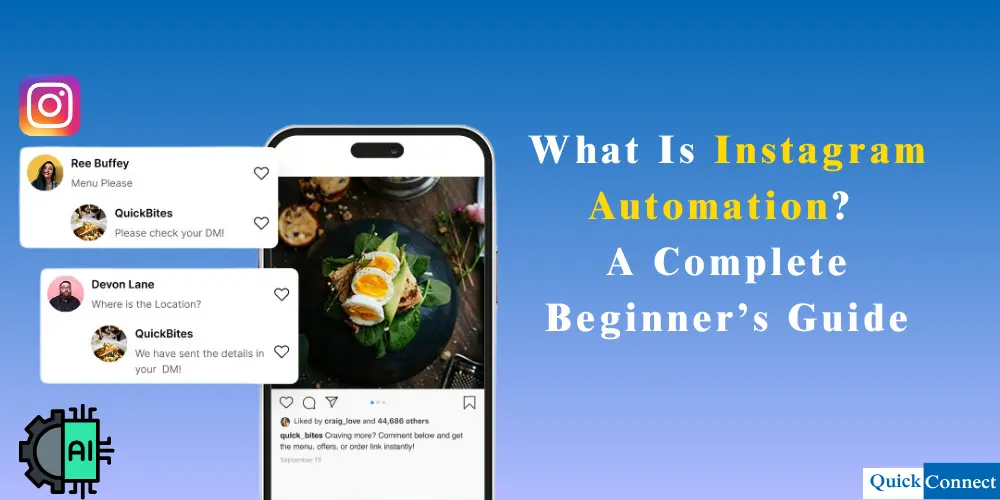
QuickConnect Automation tracks Instagram comments, DMs, and story replies in real-time. When someone uses a keyword related to a product, QuickConnect will immediately respond with the correct and accurate information.
2. Convert Engagement into Sales
It also enables you to automatically send links or discount codes directly to the customer’s DMs. This will allow you to convert every single person engaging with your account into a customer.
3. Increase Your Reach with Engagement
Providing a response to every person who engages with your posts and reels will increase your account’s visibility on Instagram. This will also increase the number of people interacting with your account as a result, your engagement and follower count both increase simultaneously.
4. Perfect for Creators and Growing Brands
Whether you’re launching a product or having a giveaway, QuickConnect will help you automate every single thing. This will also increase the number of people interacting with your account.
5. Intelligent Replies Powered by AI
QuickConnect does not just respond to keywords; its artificial intelligence also understands the intent of the customer using the product information and past conversations. As a result, it provides an accurate response every single time, keeping the customer happy and satisfied.
How to Use QuickConnect Instagram Automation
QuickConnect AI-powered Instagram Automation provides you the tools to set up automated responses for your followers. Each time a user comments or DMs, QuickConnect Automation delivers a personalized comment reply and DM in realtime.
Before you begin automation, you need to create a QuickConnect account and connect it to your Instagram business account. Make sure you have a business account!
Now, here’s a simple, step-by-step guide to automating your Instagram account and making every customer interaction count.
Step 1: Navigate to Automation
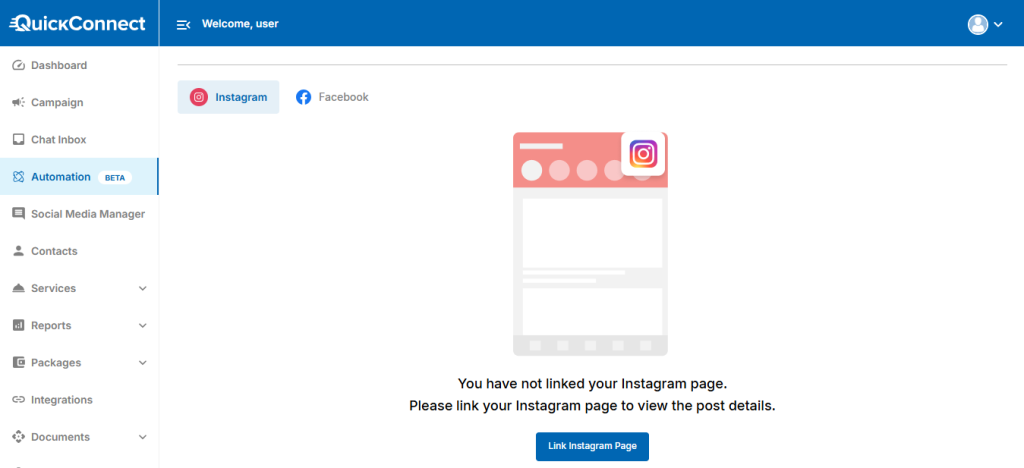
Once you log in to your QuickConnect dashboard, let’s head to Automation from the left-hand navigation menu. This is where you’ll create and manage all your automated comment and DM workflows.
Step 2: Choose Your Preferred Channel
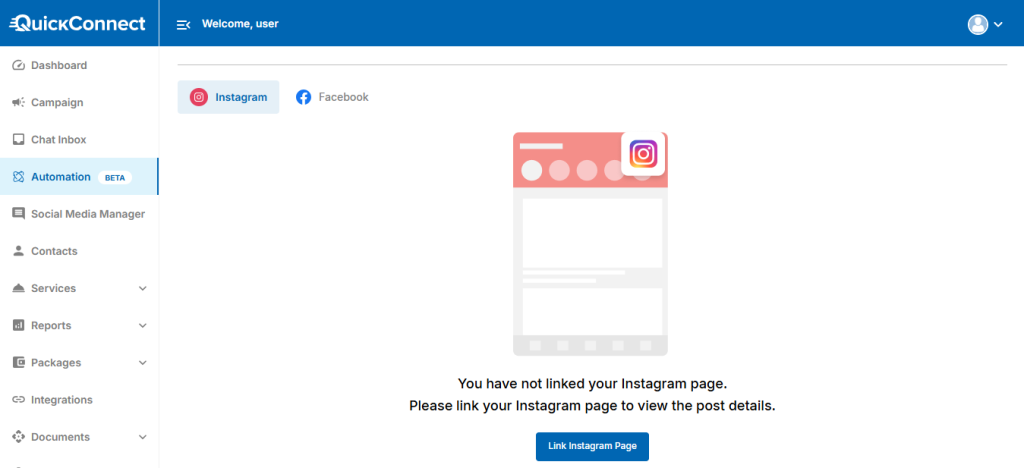
As a first-time user, you’ll have to link your Instagram page to view the post details. Make sure you are logged in to your Facebook and Instagram business accounts and that those accounts are interlinked.
Step 3: Create a New Automation
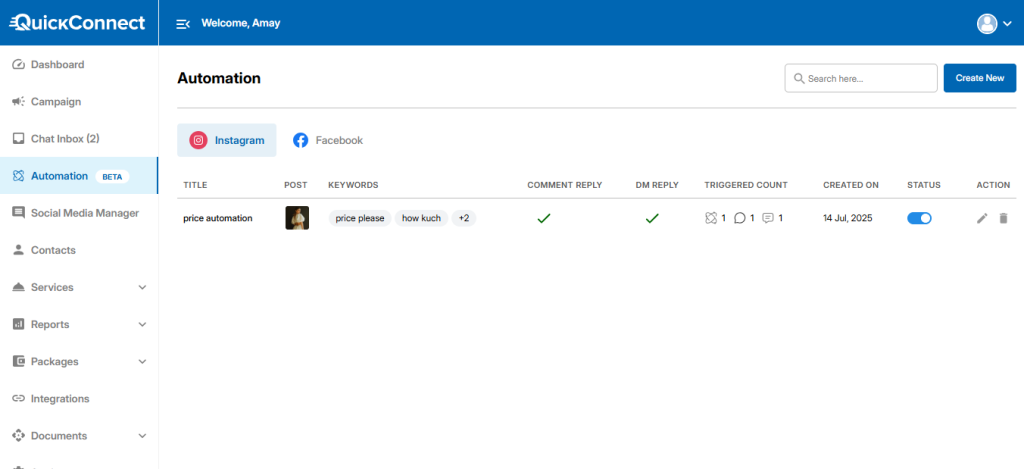
Now, to start a brand new automation, click on Create Automation. You’ll have an option to choose between Facebook and Instagram. Obviously, you need to select Instagram to set up AI automation for your Instagram posts, reels, or stories.
Step 4: Select an Instagram Post, Reel, or Story
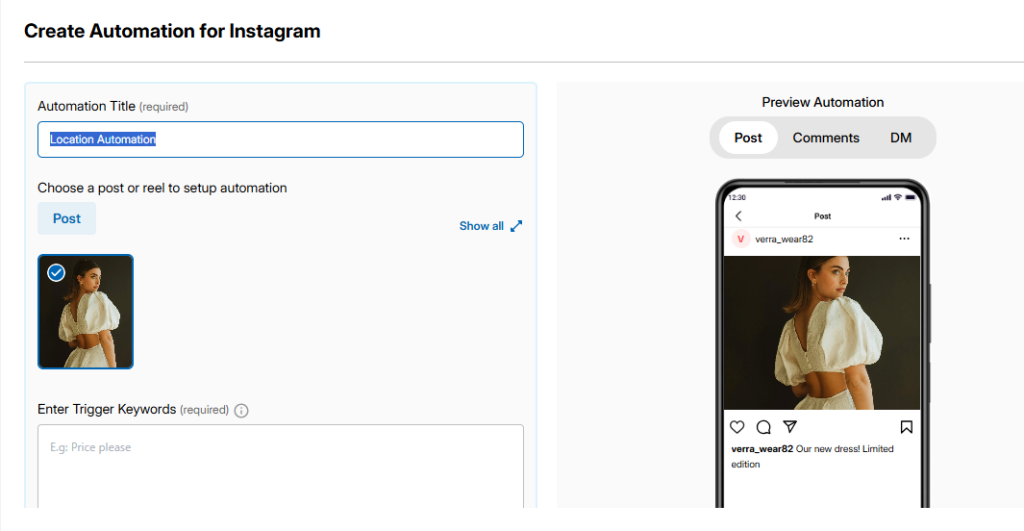
The next step is to give your automation a clear and relevant title. Let’s say if it’s location related automation, you can name it “Location Automation.” QuickConnect allows you to set up automation for both Instagram posts/reels and stories.
For posts or reels:
- Click Show All to view your full list of Instagram posts and reels.
- Click Sync Now to fetch the latest content.
- Choose the specific post or reel where you want the automation to apply.
This ensures automation is tied only to the content you want to promote.
Step 5: Choose Your Automation Trigger
To trigger your automation flow, you need to set a keyword. When a user types this keyword in your post comments or DMs, they’ll be sent your automatic response. QuickConnect offers two powerful trigger options.
- Keyword Automation Trigger
This option lets you trigger replies based on specific words or phrases users comment on.
For example, if your main keyword is “location”, you can add multiple variations like:
- location
- branch
- address
- store location
- Where are you located
- how to find you
- direction
This ensures your automation responds accurately regardless of how the question is phrased.
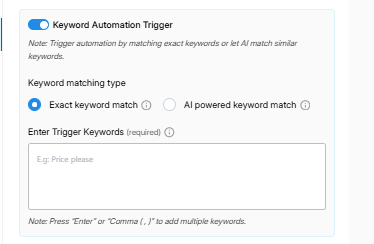
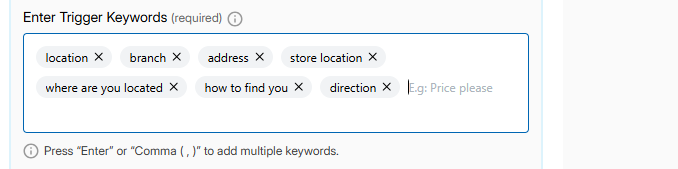
You can either:
- Manually add keywords, or
- Use our AI-Powered Keyword Match by entering one main keyword and letting QuickConnect AI detect related variations automatically.
This means you don’t have to worry about missing out on various ways people might ask the same question. The AI is constantly learning and will recognize similar keywords, which ensures your automated response is accurate and consistent for your customers asking questions. Not only does this save you time and effort, but it also makes it more efficient and faster for your followers who get the information they need without any delay.
Note: You can only enter 1 keyword under AI powered keyword matching. And AI-powered keyword matching is available in the trial and paid plans.
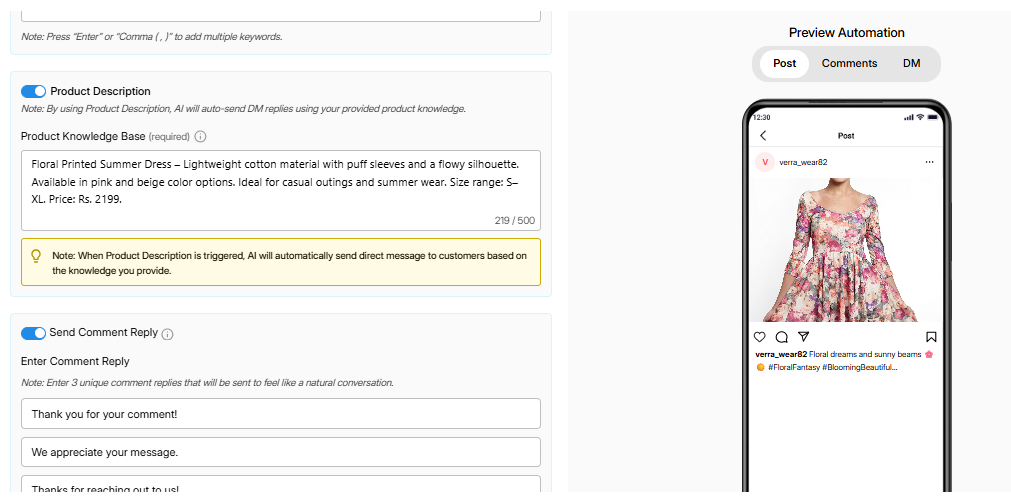
2. Product Description
With Product Description, you enter detailed product information into the Product Knowledge Base, such as:
- Product name
- Key features
- Materials
- Color options
- Size specifications
- Intended use
QuickConnect AI analyzes this data to clearly understand your product’s intent, features, and use cases, allowing it to interpret customer questions more accurately. Based on this understanding, the AI can respond with relevant and precise answers, automatically send personalized DM replies, and intelligently recommend the most suitable products to customers, creating a smoother and more effective conversation experience.
Note: When Product Description is triggered, AI will automatically send a direct message to customers based on the knowledge you provide.
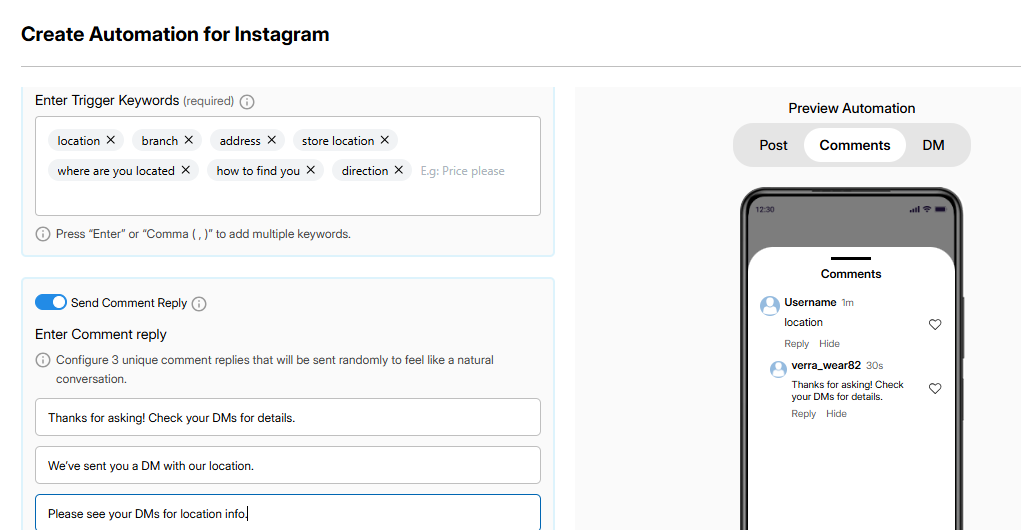
Step 6: Set Up Comment Replies
The next thing you need to do is to input the automated responses that you would like to send to the comments. It is essential to have three different automated responses so that your responses look as natural and human-like as possible. This way, your audience will get a feeling of being attended to even though it is automated.
You can also view the comment automation preview on the right side of your screen.
Step 7: Configure Auto DM Replies
This option enables you to send a direct message instantly to any individual who engages your post or reel by commenting on a word. All you have to do is type out the word or message that you want them to receive.
This option is a fantastic way to connect with individuals, provide them with value, and save time. This option enables you to provide individuals with something of value, which turns a simple engagement into something much more meaningful without having to do any actual work.
Also, if you have the Product Description feature, then it can be used to trigger a direct message to your customers based on the knowledge you provide.
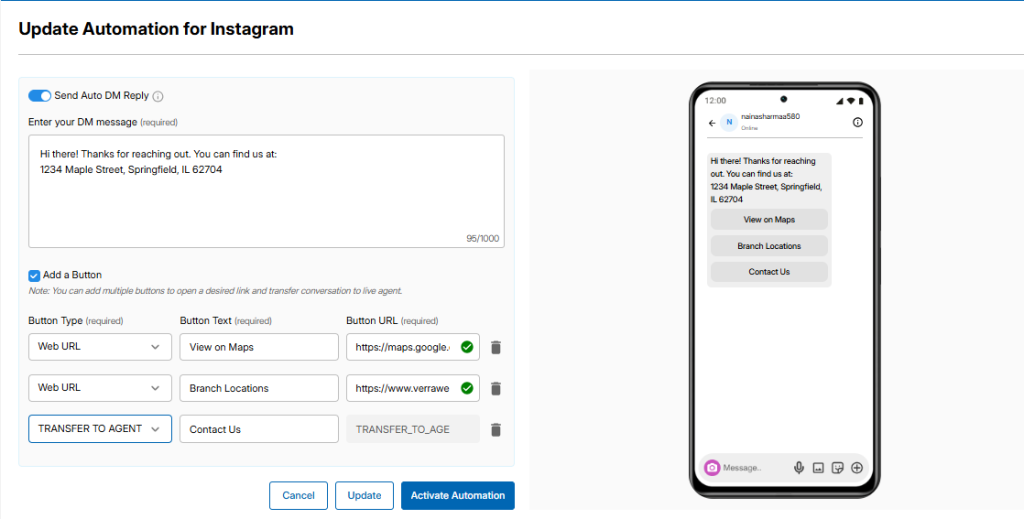
To send private messages automatically, turn on Send Auto DM Reply.
- Write the DM message you want users to receive.
- Add CTA buttons by enabling Add a Button.
- Choose button types like Web URL or Transfer to Agent.
The Transfer to Agent option seamlessly routes the conversation to a live agent when needed.
A real-time preview appears on the right side of the screen so you can see exactly how your DM will look before going live.
Step 8: Activate Automation
Once everything is set:
- Save as Draft to review later, or
- Click Activate Automation to launch it immediately.
Your automation is now live. Every eligible comment or interaction will trigger instant replies and DMs automatically.
Extra: Automating Instagram Stories
You can also apply automation to Instagram Stories.
Simply select an active story, then define:
- Automation title
- Trigger keywords
- Automated DM reply
- CTA button text and URL
Preview the message in real time, then save as a draft or activate instantly.
Tada! Your Instagram Automation is ready! It’s as simple as that!
You’ve seen how automation works—now it’s your turn. Create your QuickConnect account and start automating your DMs, comments, and replies today. No tech skills required, just pure growth.
Create Free Account →What to Automate and What to Keep Human
Automation works best when it supports real interaction, not replaces it.
Good things to automate:
- FAQs like pricing, availability, or links
- First replies to comments and DMs
- Lead collection and basic information sharing
Things to handle personally:
- Emotional messages
- Complaints or sensitive issues
- High-value sales conversations
QuickConnect helps you catch every conversation. You decide when to step in.
Instagram Automation Mistakes to Avoid
Not all automation is good automation. To grow safely:
- Avoid auto-follow and unfollow tactics
- Never send bulk, spammy DMs
- Skip fake likes or fake engagement
- Do not run automation nonstop without breaks
QuickConnect is designed to avoid these risky shortcuts and keep your account healthy.
Conclusion
Instagram automation helps businesses respond faster, engage consistently, and capture more leads without manual effort. With QuickConnect, you can automatically handle DMs, comments, and story replies while turning everyday interactions into meaningful conversations. This not only saves time but also ensures that no potential customer is missed. By using Instagram automation strategically, businesses can scale their engagement and convert followers into loyal customers.