


QuickConnect vs Tidio:
Which Platform Actually
Grows With Your Business?
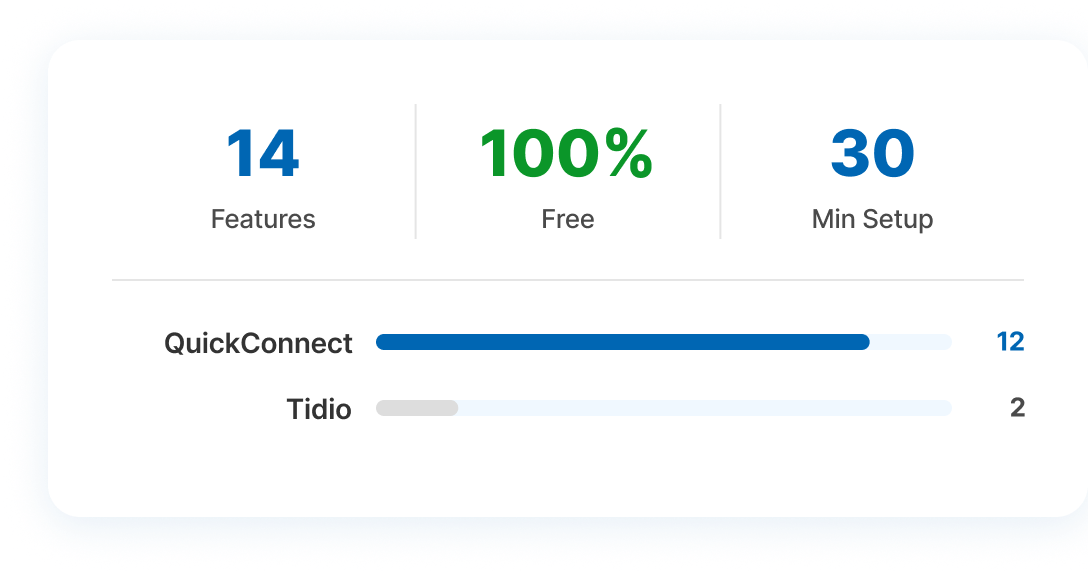
Tidio handles website chat well. But if your business needs multichannel campaigns, social media automation, and a truly unified inbox, QuickConnect gives you everything and without the add-on fees.
QuickConnect vs Tidio: What Are They?

QuickConnect
An AI-powered, all-in-one customer engagement platform built for businesses that need to communicate across multiple channels simultaneously. Unified inbox, AI chatbot, outbound campaign management (WhatsApp, SMS, Viber), live chat, social media automation, and analytics — all in one dashboard, at no cost.
Unified Inbox
AI Bot
AI Customer Support
SMS Campaigns
Viber
Social Media Automation
Free Live Chat
Mobile App
Tidio
A customer service platform widely used by small e-commerce businesses. Covers website live chat, help desk, rule-based chatbots (Flows), and an AI agent called Lyro. Handles inbound website chat well — but AI and automation are sold as separate paid add-ons, and outbound marketing (WhatsApp, SMS, Viber) simply isn't part of its product.
Live Chat
Help Desk
Lyro AI (add-on)
Flows Automation (add-on)
Shopify Integration
Where QuickConnect Outperforms Tidio
Channel Coverage: Proactive Marketing vs. Reactive Support
- QuickConnect
- Reach customers on WhatsApp, SMS, Viber, Instagram & Facebook
- Launch outbound broadcast campaigns across all channels
- Automate Instagram comment replies into private DM conversations
- Manage every response from a single unified inbox
- Tidio
- Covers website live chat, email, and basic Messenger
- Only handles incoming messages — no outbound campaigns
- Cannot send broadcast WhatsApp, SMS, or Viber campaigns
- Requires separate tools for proactive outreach
Pricing Transparency: Predictable vs. Surprisingly Complex
- QuickConnect Pricing
- Free Plan — $0/month with no credit card required
- Includes: Live chat, AI bot, unified inbox, and full automation
- One flat experience — no add-ons, no hidden meters
- No surprise invoices or usage-based charges
- Tidio Pricing
- Free Plan limited to only 50 conversations/month
- Growth Plan — $59/month (250 conversations only)
- Lyro AI add-on: +$29/month (50 AI conversations)
- Flows automation: +$25/month — real cost: $150–$250/month+
Automation: Built-In vs. Billed Separately
- QuickConnect
- Automation is part of the core product — not an add-on
- Set up Instagram comment-to-DM flows from day one
- WhatsApp drip sequences and cross-channel triggers included
- Workflows scale with your business, costs don't
- Tidio
- Flows automation is a separate paid add-on subscription
- Lyro AI has its own independent usage-based billing meter
- Three billing counters running simultaneously
- Monthly bill is difficult to forecast during busy periods
Ease of Setup: Up and Running vs. Configuration Confusion
- QuickConnect
- Sign up and connect channels — live in under 30 minutes
- Everything available from day one: inbox, campaigns, AI bot
- No separate product purchases or confusing billing sections
- Clear, straightforward onboarding with guided setup wizard
- Tidio
- Initial live chat setup is straightforward
- Unlocking full features requires buying Lyro AI and Flows separately
- Each add-on has its own dashboard and billing settings
- Users report confusion about what's actually included in their plan
Is QuickConnect the Right Tidio Alternative for You?
QuickConnect is built for businesses that need more than a reactive chat widget. Here is the profile of a business that gets the most out of it:
-
You need AI-powered customer support running 24/7
-
You want to run WhatsApp, SMS, or Viber campaigns
-
You need Instagram and Facebook automation at scale
-
You want every feature bundled at a predictable price
-
You're growing fast and can't afford billing surprises
-
You want a single inbox for all customer conversations
How to Switch from Tidio to QuickConnect in 3 Steps
Sign Up Free
Create your QuickConnect account in under 2 minutes — no credit card required. Your free plan includes AI bot, live chat, and unified inbox from day one.
Connect Your Channels
Link WhatsApp, Instagram, Facebook, SMS, and Viber through our guided setup wizard. Each channel walks you through the connection process step by step.
Go Live
Configure your AI bot and automation flows, run a quick test, and you're ready. Our team is on hand to support you at every stage of the onboarding process.
Frequently asked questions
QuickConnect connects all your channels as WhatsApp, Instagram, Facebook, SMS, and Viber — from a single dashboard, with no additional product purchases needed. Everything is available from the moment you sign up, completely free. With Tidio, unlocking the full feature set requires separately purchasing and configuring AI and automation add-ons, each with their own billing. Most QuickConnect users are fully live within 30 minutes, with no guesswork about what is or is not included in their plan.
QuickConnect currently offers its complete feature set, AI automation, live chat, multichannel campaigns, and a unified inbox at no cost, making it one of the most accessible platforms on the market today. There are no usage meters, no per-conversation charges, and no separate billing for AI or automation. You get the full product, not a stripped-down base plan.
QuickConnect is worth serious consideration if your business needs more than reactive website chat. It combines AI automation, multichannel outbound campaigns, Instagram and Facebook DM flows, and a unified inbox into one platform with no add-on purchases, no usage-based billing surprises, and no hidden costs. Right now, the entire platform is free. As QuickConnect’s pricing evolves, early adopters who build their workflows now stand to benefit the most.
QuickConnect’s AI Bot is currently available at no cost and handles customer conversations 24/7 across all connected channels from the moment you sign up. Tidio’s Lyro AI, by contrast, is a separate paid add-on with its own conversation-based billing meter, meaning your AI costs scale independently as your message volumes grow. QuickConnect lets you access AI-powered automation without any of those additional charges.