Many business owners and service providers consider it very exhausting to manage WhatsApp messages daily. Messages continue to come in, replies are sent late, and customers begin to feel neglected or disoriented. This eventually results in lost leads, dissatisfied buyers, and undue stress during peak hours.
Now, imagine a setting where messages are replied to on time, and you don’t have to be glued to your phone all day. Clear replies, updates, and help come through even when you are offline or too busy with your customers. This is exactly what WhatsApp automation helps you achieve in a simple and practical way.
With this guide, you’re going to learn what WhatsApp automation really means, how it works step by step, and how to use it without confusion.
What is WhatsApp Automation?
WhatsApp automation involves the use of different tools to send messages on WhatsApp automatically. This means that, instead of manually responding to each message, the system replies for you according to specific rules you set.
At its core, automation works when a user takes an action, and that action triggers a reply. For example, someone sends “Hi,” and they instantly get a welcome message. Everything happens in the background while you focus on other work.
WhatsApp automation is not about spamming people but about helping them faster. When done right, it feels natural and useful, not robotic.
Here is what WhatsApp automation usually includes:
- Auto-replies to common questions
- Messages sent at the right time
- Simple chat flows that guide users
- Follow-ups without manual effort
It works best for support, sales, updates, and basic questions. You stay responsive even when you are busy, asleep, or offline.
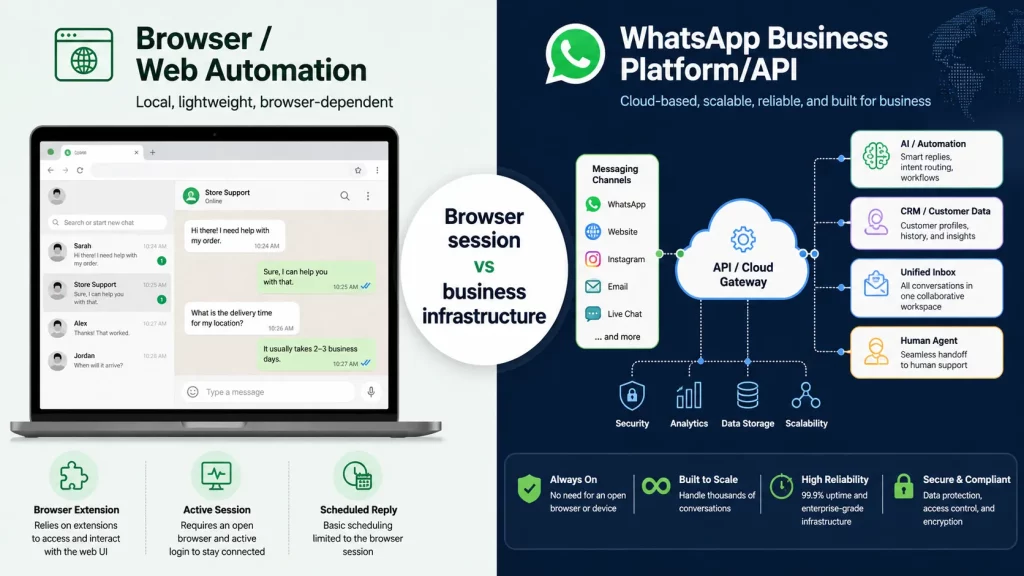
It is also important to distinguish official business automation from browser-based tools. See our guide to WhatsApp Web automation to understand how the two approaches differ
Types of WhatsApp Automation You Can Use
WhatsApp automation comes in different forms, and each type solves a different problem. You do not need to use everything at once, and starting small is usually the best approach.
1. Auto-replies and instant responses
Auto-replies respond instantly whenever someone tries to contact you through WhatsApp. This is useful when people need answers instantly and do not like waiting. Just a simple and direct answer will make them feel recognized. You can send auto-replies for greeting messages, timings when your business is open, or for the queries people ask on a daily basis. You should provide your work timings or geographic locations through auto-replies.
Auto-replies are a great way to reduce busy periods. Sending immediate replies will reduce irritations and enhance friendship with new contacts. It also allows users to respond in a proper way when they have more time. Auto-replies are easy to configure and manage. They are the entry level for many businesses for carrying out automation on the WhatsApp platform.
2. Broadcast and bulk messaging
Broadcast messaging allows you to send one message to many contacts at the same time. Each person receives it as a personal message instead of a group chat message, keeping the communication clean and private. This type of automation is useful for announcements, updates, or special offers. For example, you can share holiday hours or new service details. Bulk messaging ensures your message stays consistent for everyone. You do not have to rewrite the same message repeatedly. Timing also becomes easier to control. Permission is very important here. Only message people who agreed to receive updates, because trust matters.
3. Chatbots and conversational flows
Chatbots assist in guiding the user in a conversation using simple questions and answers. It does not require much explanation. The user selects options to proceed step by step. It is an effective way to answer questions or guide a user on the proper service to use. They reduce the load on human support teams. This keeps things running smoothly. Good AI chatbots know when to pass the conversation to a real person. This balance improves the overall experience.
4. Order updates, alerts, and reminders
This automation sends messages when something important happens. For example, an order confirmation or delivery update is sent automatically. Customers stay informed without asking. Alerts reduce repeated questions from users, and people also feel confident when they know what is happening, improving satisfaction and trust. Reminders are also helpful for appointments or payments. They reduce missed bookings and delays, saving time for both sides. These messages feel helpful because they arrive at the right moment.
5. Lead capture and follow-up messages
Automation can help collect leads directly through WhatsApp chats. You can ask simple questions like name or an interest, one step at a time which feels less formal than forms. Once a lead is captured, follow-up messages can be sent automatically. For example, a thank-you message or next steps message can go out. This process keeps your lead list organized and active. Every inquiry gets attention, which helps to improve response rates. Follow-ups should always sound polite and helpful. Avoid pushing users too hard.
What Are Benefits of WhatsApp Automation
Small businesses have to handle multiple tasks all at once, and that complicates communication. WhatsApp automation helps reduce the pressure and keeps conversations organized.
1. Faster replies and better customer experience
Fast replies matter on WhatsApp because people expect immediate responses. Automation helps you meet this expectation with no stress. Users feel they are being heard right that instant. Quick replies raise trust and comfort. Customers get confident if communication is smooth, keeping up the relationships. A good experience often leads to repeat customers. People remember how you treated them. Happy customers are more likely to recommend your business to others.
2. Saves time and reduces manual work
Replying to the same questions manually wastes time. Automation handles those repetitive tasks for you, which can free up your time. Your team can focus on important conversations. Complex issues get better attention, and work feels less rushed. You can use the time saved for planning and growth. Productivity improves naturally. Automation supports people instead of replacing them.
3. Consistent messaging without human errors
When you use WhatsApp automation, every message is delivered in the same clear and consistent way. Unlike humans, automation doesn’t make mistakes or give different answers to the same question. This builds trust with your customers and ensures communication always feels professional. A steady tone also strengthens your brand image and reduces follow-up issues caused by errors or confusion.
4. Works 24/7 without extra staff
You cannot reply all the time, especially outside working hours. Automation covers that gap smoothly. Messages go out even when you are offline. Customers do not feel ignored as they receive helpful responses anytime. Small businesses benefit greatly from this flexibility.
5. Helps organize chats and contacts
WhatsApp automation makes it easy to keep conversations and contacts organized. Leads, customers, and orders can be labeled and sorted automatically, so nothing gets lost. Clear organization reduces confusion, especially on busy days, and makes work easier to manage. You can track conversations at a glance, follow up more efficiently, and provide better service overall.
Learn More: WhatsApp vs WhatsApp Business
Step-by-Step: How WhatsApp Automation Works?
WhatsApp automation is a simple and straightforward process when done correctly in the beginning. You decide what should happen when a message is received in your WhatsApp account. The system follows all the instructions and delivers the correct response at the correct time. When all this is complete, the whole thing continues in the background successfully.
- Choosing the right WhatsApp account: The starting step is the selection of the right WhatsApp account. Small businesses can use the WhatsApp Business account without any hassles. It provides the basic features, which can be easily managed. If the volume of messages increases, then move on to the advanced features.
- If your main goal is customer communication and support rather than workflow automation, explore WhatsApp integration for customer support
- Connecting WhatsApp API or automation tool: After selecting the account, connect it with a WhatsApp automation platform such as QuickConnect. The automation tool is responsible for regulating how the messages are sent and received. The majority of the automation tools tend to walk a user through it. After which, it becomes possible to automatically process messages.
- Setting triggers and rules: Triggers determine the timing of sending the message to the user. For example, a greeting message triggers a welcome message. Rules are used to determine the message that goes out after the trigger. The triggers should always be simple to enable easier automation.
- Creating message templates: Message templates can be referred to as pre-written replies that can be used in automation. It is beneficial in that it ensures the messages remain clear to all users. The templates can use simple language and a friendly tone. When the templates are effective, the conversation flow becomes natural.
- Testing automation before going live: Testing is a very important activity that needs to happen before the automation process is launched with actual users. It is a good practice to send test messages and trace the entire conversation flow.
Ready to Automate WhatsApp for Your Business?
Put WhatsApp automation into practice with QuickConnect. Build automated workflows, answer common questions, capture and qualify leads, and hand conversations over to your team when human support is needed.
Explore QuickConnect WhatsApp Automation →Conclusion
WhatsApp automation is a convenient way to bring order, efficiency, and simplicity to daily messaging. It helps a business to respond to inquiries, remain more organized, and serve customers efficiently without putting in much effort physically. Automation, if done properly, is an effortless, natural, and very valuable tool that is not intrusive, pushy, or cold in nature. There’s no need to spend a fortune to experience the benefits.
By starting small, you are better positioned to learn, adapt, and grow in automation. When everything goes as expected, WhatsApp automation becomes a quiet sidekick that works behind the scenes. It aids in facilitating better conversations, building trust, and ensuring better communication in businesses. By leveraging it, businesses are in a position to be responsive while customers feel heard.