Table of Contents
- What Is WhatsApp Web Automation?
- How Does WhatsApp Web Automation Work?
- What Can You Automate on WhatsApp?
- WhatsApp Web Automation vs WhatsApp Business Platform/API
- Can You Automate WhatsApp Web Without an API?
- Is WhatsApp Web Automation Safe and Allowed?
- WhatsApp Web Automation Examples
- Benefits and Limitations
- When Should a Business Move Beyond WhatsApp Web Automation?
- Where QuickConnect Fits Into WhatsApp Automation
- Conclusion
WhatsApp Web automation means using software to perform or assist with actions inside the WhatsApp Web browser interface, such as sending scheduled messages, generating replies, or processing incoming chats. It is different from automation built on Meta’s official WhatsApp Business Platform/API. For businesses, that distinction matters because the two approaches differ in support, reliability, integrations, scalability, and policy risk.
Quick AnswerWhatsApp Web automation uses browser-based tools, extensions, scripts, or bots to automate activity in WhatsApp Web. It can help with tasks such as replies, follow-ups, or message sending, but it is not the same as official WhatsApp Business Platform/API automation , which is designed for business integrations, workflows, approved outbound messaging, and scalable customer communication.
What Is WhatsApp Web Automation?
WhatsApp Web automation is a broad term for software that interacts with the web version of WhatsApp on a user’s behalf.
Depending on the tool, the automation may run through a browser extension, desktop/browser control, or another software layer connected to a WhatsApp Web session. Common examples include scheduled sending, automatic replies, message templates, contact processing, and AI-assisted response generation.
For example, a local service business might use a browser tool to acknowledge new messages while an employee is busy. The important point is that the automation is operating around the WhatsApp Web experience rather than through the official WhatsApp Business Platform.
That difference becomes increasingly important when a company needs multiple agents, CRM connections, reliable workflows, structured outbound messaging, or long-term business continuity.
If you want a broader look at business messaging workflows, see our WhatsApp automation guide, which explains how businesses can automate conversations, support, and customer communication.
How Does WhatsApp Web Automation Work?
At a conceptual level, an automation watches for an event and then performs a predefined action.
Typical flow:
Customer message
→ automation detects the message or trigger
→ rule or AI decides what should happen
→ reply, follow-up, or another action is performed
→ conversation may be logged or handed to a person
A browser-based tool may depend on an active WhatsApp Web session and on the structure of the web interface. An API-based business system works differently: messages and events are exchanged through Meta’s business messaging infrastructure and can be connected to software such as inboxes, CRMs, bots, analytics systems, and workflow tools.
What Can You Automate on WhatsApp?
The exact capabilities depend on the method you use.
With browser-based WhatsApp Web automation, tools commonly advertise functions such as:
- automatic or suggested replies
- scheduled messages
- reusable message templates
- personalized message sending
- follow-up reminders
- simple keyword-based responses
- AI-assisted drafting
- browser-based bulk sending
Business Platform/API-based automation can support more structured business workflows, including:
- customer-support automation
- FAQ and knowledge-base answers
- lead qualification
- conversation routing
- order or service updates
- appointment reminders
- approved outbound templates
- CRM or help-desk updates
- AI-powered conversations
- multi-agent support
- human escalation
The feature name alone does not tell you which method is being used. A product described as a “WhatsApp bot” or “WhatsApp automation tool” may be browser-based, API-based, or a combination. Businesses should verify the underlying integration before choosing a tool.
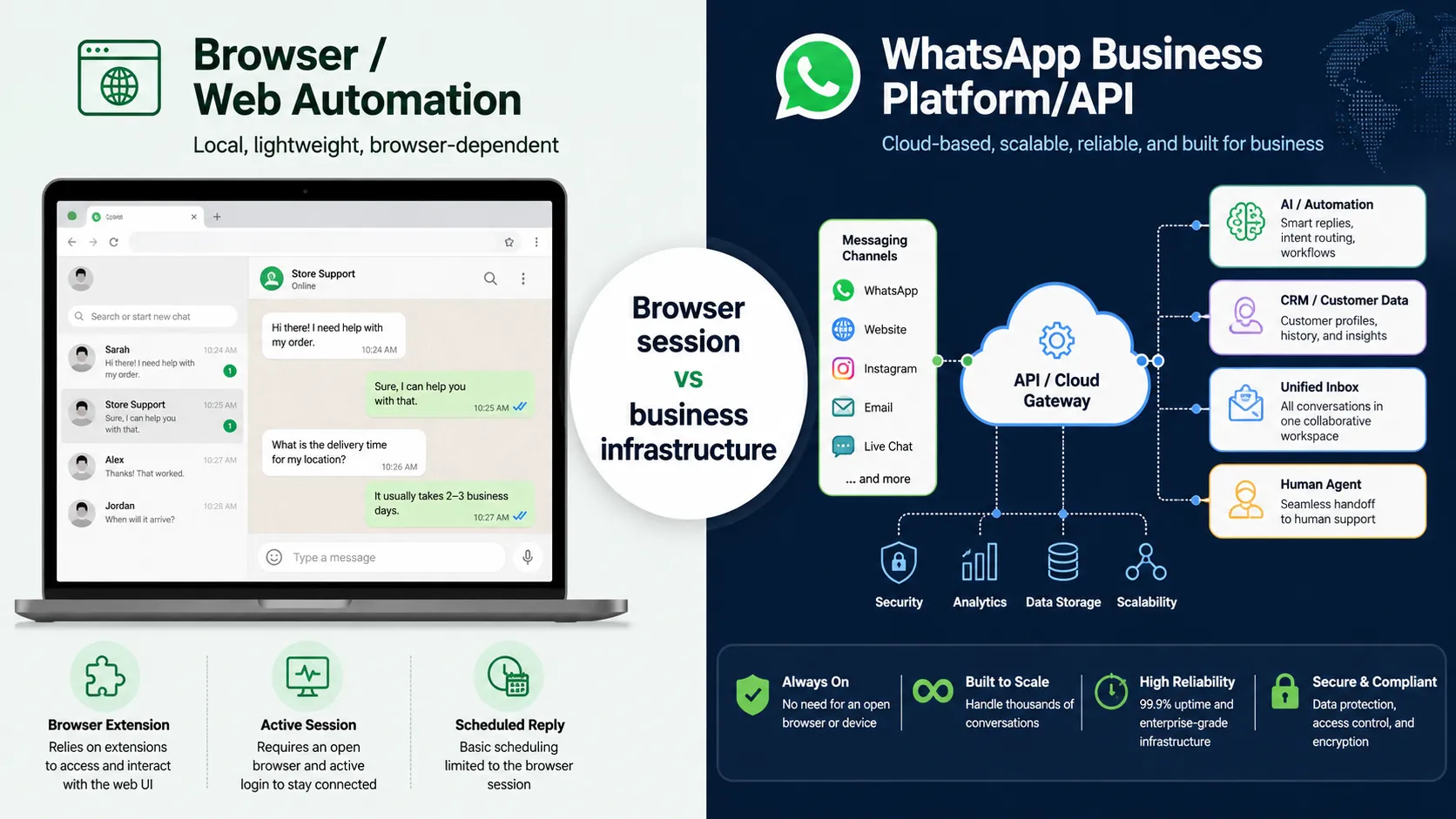
WhatsApp Web Automation vs WhatsApp Business Platform/API
| Area | WhatsApp Web automation | WhatsApp Business Platform/API |
|---|---|---|
| How it works | Interacts with or around a WhatsApp Web session | Uses Meta’s official business messaging infrastructure |
| Official business infrastructure | No, not merely because it runs in WhatsApp Web | Yes |
| Browser/session dependency | Often dependent on a browser or linked session | Not dependent on keeping WhatsApp Web open |
| Reliability | Can be affected by session or interface changes | Designed for production business messaging |
| Multiple agents | Tool-dependent and often limited | Can be integrated with shared team inboxes |
| CRM/integrations | Possible in some tools, but method varies | Designed for integrations and workflows |
| AI/workflows | Possible through third-party browser tools | Can be connected to bots, AI, webhooks, and business systems |
| Outbound business messaging | Tool-dependent; policy must be reviewed carefully | Uses WhatsApp’s template and messaging rules |
| Policy considerations | Higher scrutiny when tools scrape, reverse-engineer, or interact without authorization | Governed by WhatsApp Business Platform policies |
| Best fit | Limited experiments or personal productivity only after reviewing the method and policies | Ongoing business support, automation, integrations, and scalable messaging |
The biggest mistake is assuming these are simply two names for the same technology. They are not.
Businesses that need an official channel for customer conversations can explore WhatsApp integration for customer support to see how WhatsApp can fit into a broader support and communication workflow
Can You Automate WhatsApp Web Without an API?
Yes, browser-based WhatsApp Web automation tools exist without using the official API. But “possible” does not automatically mean suitable for a production business.
A business should evaluate:
- whether the tool is authorized to interact with WhatsApp
- how it accesses or processes message data
- whether it relies on scraping or reverse engineering
- what happens when the web interface or session changes
- how customer consent is managed
- whether the number is important enough that disruption would hurt operations
- whether the workflow must be available continuously
- whether multiple employees need controlled access
WhatsApp’s Business Terms restrict activities such as scraping, reverse engineering, and using applications that interact with its Business Services without prior written consent. That makes the implementation method—not just the feature list—an important part of the decision.
Is WhatsApp Web Automation Safe and Allowed?
There is no useful one-word answer. It depends on how the automation works and how the business communicates.
For business messaging, WhatsApp’s current Business Messaging Policy requires businesses to obtain appropriate opt-in before contacting people, respect opt-out requests, avoid spam or misleading communication, and protect customer data.
For the WhatsApp Business Platform, business-initiated conversations use approved message templates, while a business may send free-form replies within the 24-hour customer service window after a user’s message. WhatsApp also requires a clear escalation path when automation is used for customer service.
Browser automation introduces an additional question: is the underlying interaction with WhatsApp authorized? Methods involving scraping, reverse engineering, or unauthorized applications can conflict with WhatsApp’s terms. A Chrome extension being publicly available does not by itself mean WhatsApp has approved it.
For business-critical communication, review the tool’s integration method, WhatsApp’s current policies, your privacy obligations, and applicable local laws before deployment.
WhatsApp Web Automation Examples
1. Ecommerce support
A customer asks, “Where is my order?”
Automation identifies the question
→ retrieves or requests order details
→ provides an update
→ transfers the conversation to an agent if the order is delayed or disputed
A growing store will usually benefit more from an API-connected support workflow than from a browser session because order systems, customer history, and team routing need reliable integrations.
2. Education inquiries
A prospective student asks about course fees.
Automation answers common questions
→ captures the program of interest
→ answers from an approved knowledge source
→ sends a qualified inquiry to a counselor
The value is not merely an instant reply; it is the structured handoff with context.
3. Local service business
A new lead messages a clinic, repair service, salon, or consultancy.
Automatic acknowledgement
→ basic qualification questions
→ booking information
→ human handoff when needed
For a very small operation, simple app features may be enough. If several agents, integrations, or more advanced automation are needed, a business-focused platform becomes more appropriate.
4. Order and appointment notifications
A business may want to send confirmations, reminders, delivery updates, or service notices automatically. On the official Business Platform, outbound messaging is governed by WhatsApp’s message-template and consent requirements.
Businesses communicating with customers across more than one channel can also use multichannel campaigns to coordinate customer outreach alongside WhatsApp conversations
Benefits and Limitations
Automation can reduce repetitive work, improve response consistency, help route leads, and make customer conversations easier to manage.
The limitations depend heavily on the approach.
Browser-based WhatsApp Web automation may involve:
- dependence on a linked browser/session
- disruptions after interface or session changes
- maintenance overhead
- limited team controls
- uncertain integration quality
- privacy and data-handling concerns
- policy risk with unauthorized methods
- weaker business continuity for critical workflows
Official business messaging infrastructure has its own requirements, including onboarding, messaging policies, templates for certain outbound conversations, consent, and platform costs. It is not “unlimited messaging,” but it is designed for business integrations and ongoing automation.
When Should a Business Move Beyond WhatsApp Web Automation?
Use the business requirement—not just price or setup speed—to choose the approach.
WhatsApp Automation Decision Framework
| Your need | More suitable starting point |
| Manual one-to-one customer messaging | WhatsApp Business App |
| Very limited browser experiment | Evaluate WhatsApp Web automation only after checking authorization, privacy, and policy implications |
| Shared conversations for a team | Business-focused shared inbox |
| CRM, ticketing, or workflow integrations | WhatsApp Business Platform/API |
| AI answers connected to business knowledge | Business automation platform using supported WhatsApp integration |
| Structured outbound notifications | WhatsApp Business Platform/API |
| Large-scale customer support | Official business-oriented infrastructure with routing and human escalation |
If you’re still deciding which WhatsApp option fits your needs, read our guide to WhatsApp vs WhatsApp Business for a clearer comparison of the available approaches
If WhatsApp is becoming a core customer-service or sales channel, the cost of downtime, lost context, or account disruption usually matters more than saving a few setup steps.
Where QuickConnect Fits Into WhatsApp Automation
For businesses that need more than browser-based automation, QuickConnect provides an API-based approach to managing WhatsApp conversations alongside other customer communication channels.
With QuickConnect, teams can bring WhatsApp conversations into a Unified Inbox, use the AI Bot to assist with common customer questions and human handoff, and manage WhatsApp alongside channels such as Instagram, Facebook, Viber, email, and web chat.
The key difference is that this is not about automating actions inside a WhatsApp Web browser session. It is designed for businesses that need more structured customer communication, team collaboration, AI-assisted conversations, and scalable workflows.
If your business needs structured WhatsApp automation for customer conversations, AI-assisted support, and team workflows, explore QuickConnect WhatsApp Automation to see how it can fit into your communication strategy.
Ready to Automate WhatsApp for Your Business?
Conclusion
WhatsApp Web automation can describe useful browser-based shortcuts, but it should not be confused with official WhatsApp Business Platform automation.
If your requirement is small and non-critical, first understand exactly how a browser tool works and what permissions and policy implications it carries. If WhatsApp is part of your customer-support, sales, campaign, AI, or CRM infrastructure, an official business-oriented integration provides a clearer foundation for long-term operations.
QuickConnect’s current public WhatsApp offering belongs to that second category: API-based business messaging connected with broader customer communication tools—not automation of the WhatsApp Web browser interface.
Ready to Manage WhatsApp Conversations at Scale?
Bring WhatsApp and other customer conversations into a more organized communication workflow with QuickConnect.
Get Started Free